
1. Open the terminal
Head to hizz.io. The landing view loads with:- AI Market Brief - today’s regime, score, breadth, and recent flow
- Macro gauges - Fear & Greed, BTC Dominance, Alt Season
- Trending tokens - the most active Cardano names by recent volume
- Docs link - direct access to docs.hizz.io
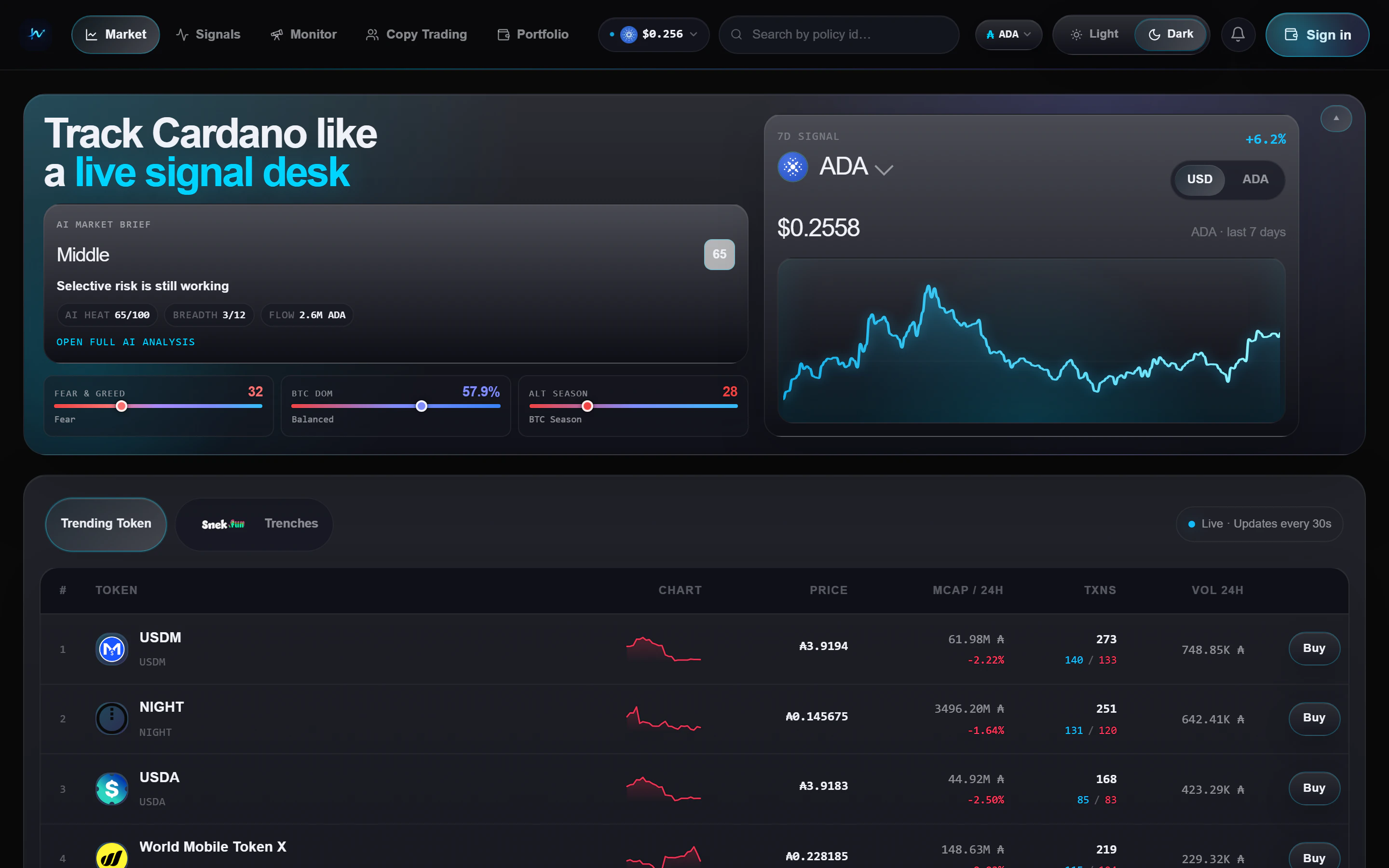
Hizz home - market pulse + trending tokens
2. Pick your scan mode
Use the main token tabs to choose how broad or how early you want to scan:- Trending
- Trenches
The broad market view. Use this when you want to see where liquidity and
attention already are across Cardano.
3. Check the signal feed
Open Signals from the nav bar. Each card is a token that matched at least one live rule. The two main reads today are:Early volume
Momentum is picking up faster than the recent baseline.
Healthier holder mix
Holder growth and concentration look cleaner than a typical sniper-heavy
launch.
4. Track smart wallets
Monitor has two tabs:- KOL Monitor - a watchlist of labeled wallets
- Snekfun Leaderboard - top traders ranked by realised PnL on snek.fun
5. Connect a wallet (optional)
Click your address / avatar top-right -> Connect wallet. Supported:- Browser extensions - Nami, Eternl, Lace, Flint, Typhon, Gero, NuFi
- Managed wallet - sign in with Google and Hizz automatically creates a Cardano (ADA) wallet for you. The wallet key is encrypted with cloud KMS to keep it secure.
- Live Portfolio view with allocation, drift, and NFTs
- One-click Buy buttons from supported trading routes
6. Check fees before you submit
Before you confirm a trade, read Trading fees.- snek.fun direct trades use the Hizz platform fee
- Other routed trades include route-specific costs inside the quote
- The trade widget shows the fee line before you sign
7. Try AI Trading (optional)
Open AI Trading when you want to work with Strike perpetual strategies instead of Cardano spot tokens.- Open a strategy from Strategy Library and inspect its rules and backtest
- Connect the Strike wallet that will hold the margin
- Choose paper or live mode, allocation, and leverage
- Monitor the deployed strategy under My agent
Next steps
Trading fees
See exactly when Hizz charges a platform fee and when the route quote
already includes trading costs.
Market page
Learn how to use Trending, Trenches, and the buy flow together.
Signals
Understand what a signal means and how to read each card quickly.
Portfolio
Connect a wallet, review allocations, and manage positions from one view.
AI Trading
Backtest a strategy, deploy a Strike agent, and read live net PnL.