> ## Documentation Index
> Fetch the complete documentation index at: https://docs.hizz.io/llms.txt
> Use this file to discover all available pages before exploring further.
# Quickstart
> Go from landing page to your first Hizz workflow in about a minute.
## 1. Open the terminal
Head to [hizz.io](https://hizz.io). The landing view loads with:
* **AI Market Brief** - today's regime, score, breadth, and recent flow
* **Macro gauges** - Fear & Greed, BTC Dominance, Alt Season
* **Trending tokens** - the most active Cardano names by recent volume
* **Docs link** - direct access to [docs.hizz.io](https://docs.hizz.io)
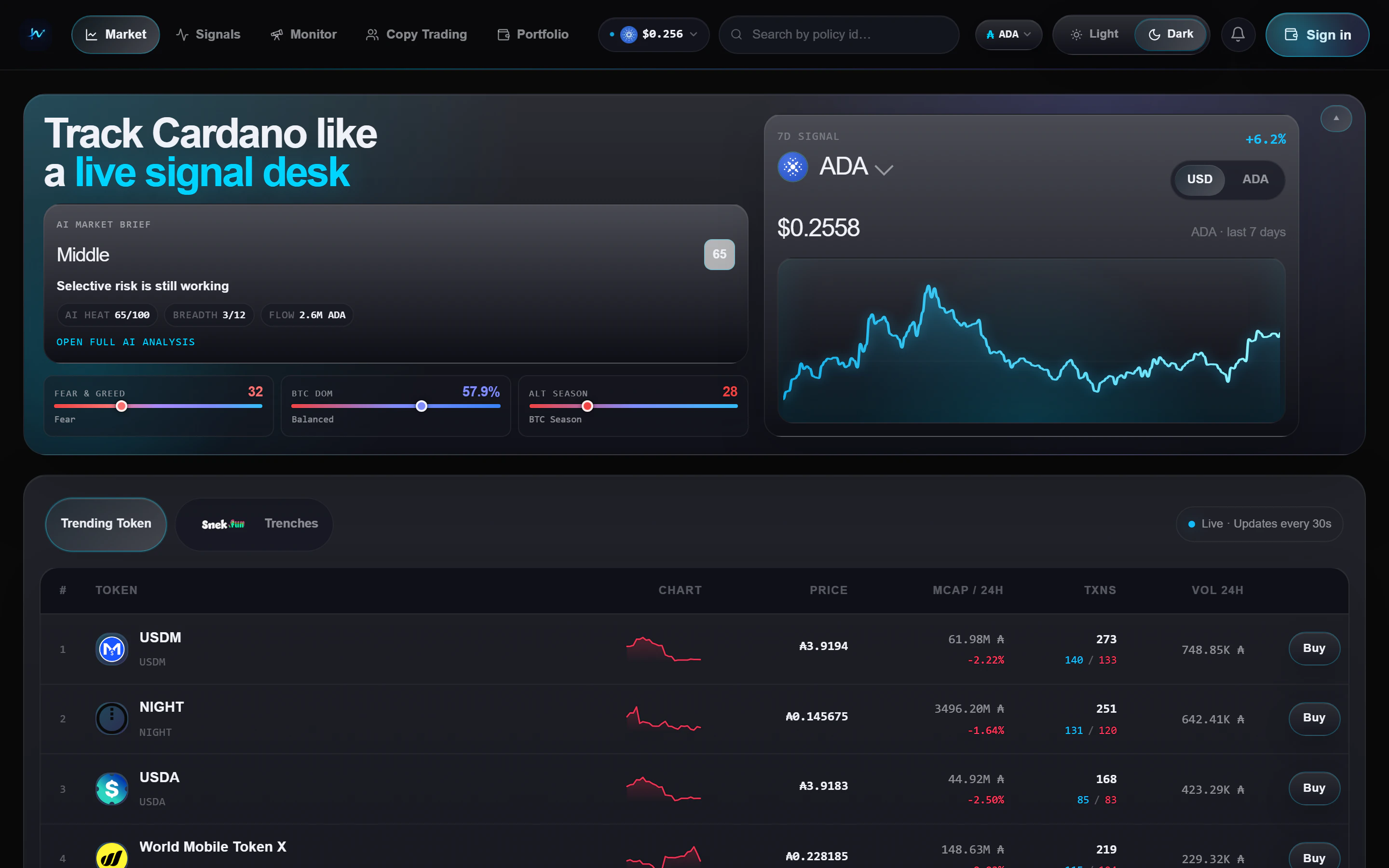 No signup, no wallet required to browse.
## 2. Pick your scan mode
Use the main token tabs to choose how broad or how early you want to scan:
The broad market view. Use this when you want to see where liquidity and
attention already are across Cardano.
The snek.fun-first view. Use this when you want to catch tokens before or
around bond completion.
The bond progress bar on each row is a visual read of how close a
snek.fun token is to graduating to a full AMM pool - useful for spotting
late-stage curve plays.
## 3. Check the signal feed
Open **[Signals](/features/signals)** from the nav bar. Each card is a token
that matched at least one live rule. The two main reads today are:
Momentum is picking up faster than the recent baseline.
Holder growth and concentration look cleaner than a typical sniper-heavy
launch.
Each card shows token metadata, holder distribution, 24h flow, bond progress,
an AI one-liner, and a **Buy** button.
## 4. Track smart wallets
**[Monitor](/features/monitor)** has two tabs:
1. **KOL Monitor** - a watchlist of labeled wallets
2. **Snekfun Leaderboard** - top traders ranked by realised PnL on snek.fun
Click **+ Add KOL** to track wallets you care about, then use that list to
cross-check what the token table and Signals feed are showing you.
## 5. Connect a wallet (optional)
Click your address / avatar top-right -> **Connect wallet**. Supported:
* **Browser extensions** - Nami, Eternl, Lace, Flint, Typhon, Gero, NuFi
* **Managed wallet** - sign in with Google and Hizz automatically creates a
Cardano (ADA) wallet for you. The wallet key is encrypted with cloud KMS to
keep it secure.
With a wallet connected you get:
* Live **Portfolio** view with allocation, drift, and NFTs
* One-click **Buy** buttons from supported trading routes
Extension wallets are still the best choice for larger balances. The managed
wallet is designed for convenience and lighter usage.
## 6. Check fees before you submit
Before you confirm a trade, read **[Trading fees](/trading-fees)**.
* snek.fun direct trades use the Hizz platform fee
* Other routed trades include route-specific costs inside the quote
* The trade widget shows the fee line before you sign
## 7. Try AI Trading (optional)
Open [AI Trading](https://hizz.io/ai-trading) when you want to work with
Strike perpetual strategies instead of Cardano spot tokens.
1. Open a strategy from **Strategy Library** and inspect its rules and backtest
2. Connect the Strike wallet that will hold the margin
3. Choose paper or live mode, allocation, and leverage
4. Monitor the deployed strategy under **My agent**
Read [AI Trading](/features/ai-trading) before deploying and use
[PnL and fees](/ai-trading/pnl-and-fees) to understand every number in the
agent panel.
## Next steps
See exactly when Hizz charges a platform fee and when the route quote
already includes trading costs.
Learn how to use Trending, Trenches, and the buy flow together.
Understand what a signal means and how to read each card quickly.
Connect a wallet, review allocations, and manage positions from one view.
Backtest a strategy, deploy a Strike agent, and read live net PnL.
No signup, no wallet required to browse.
## 2. Pick your scan mode
Use the main token tabs to choose how broad or how early you want to scan:
The broad market view. Use this when you want to see where liquidity and
attention already are across Cardano.
The snek.fun-first view. Use this when you want to catch tokens before or
around bond completion.
The bond progress bar on each row is a visual read of how close a
snek.fun token is to graduating to a full AMM pool - useful for spotting
late-stage curve plays.
## 3. Check the signal feed
Open **[Signals](/features/signals)** from the nav bar. Each card is a token
that matched at least one live rule. The two main reads today are:
Momentum is picking up faster than the recent baseline.
Holder growth and concentration look cleaner than a typical sniper-heavy
launch.
Each card shows token metadata, holder distribution, 24h flow, bond progress,
an AI one-liner, and a **Buy** button.
## 4. Track smart wallets
**[Monitor](/features/monitor)** has two tabs:
1. **KOL Monitor** - a watchlist of labeled wallets
2. **Snekfun Leaderboard** - top traders ranked by realised PnL on snek.fun
Click **+ Add KOL** to track wallets you care about, then use that list to
cross-check what the token table and Signals feed are showing you.
## 5. Connect a wallet (optional)
Click your address / avatar top-right -> **Connect wallet**. Supported:
* **Browser extensions** - Nami, Eternl, Lace, Flint, Typhon, Gero, NuFi
* **Managed wallet** - sign in with Google and Hizz automatically creates a
Cardano (ADA) wallet for you. The wallet key is encrypted with cloud KMS to
keep it secure.
With a wallet connected you get:
* Live **Portfolio** view with allocation, drift, and NFTs
* One-click **Buy** buttons from supported trading routes
Extension wallets are still the best choice for larger balances. The managed
wallet is designed for convenience and lighter usage.
## 6. Check fees before you submit
Before you confirm a trade, read **[Trading fees](/trading-fees)**.
* snek.fun direct trades use the Hizz platform fee
* Other routed trades include route-specific costs inside the quote
* The trade widget shows the fee line before you sign
## 7. Try AI Trading (optional)
Open [AI Trading](https://hizz.io/ai-trading) when you want to work with
Strike perpetual strategies instead of Cardano spot tokens.
1. Open a strategy from **Strategy Library** and inspect its rules and backtest
2. Connect the Strike wallet that will hold the margin
3. Choose paper or live mode, allocation, and leverage
4. Monitor the deployed strategy under **My agent**
Read [AI Trading](/features/ai-trading) before deploying and use
[PnL and fees](/ai-trading/pnl-and-fees) to understand every number in the
agent panel.
## Next steps
See exactly when Hizz charges a platform fee and when the route quote
already includes trading costs.
Learn how to use Trending, Trenches, and the buy flow together.
Understand what a signal means and how to read each card quickly.
Connect a wallet, review allocations, and manage positions from one view.
Backtest a strategy, deploy a Strike agent, and read live net PnL.