> ## Documentation Index
> Fetch the complete documentation index at: https://docs.hizz.io/llms.txt
> Use this file to discover all available pages before exploring further.
# Welcome to Hizz
> A live trading workspace for Cardano discovery, smart-wallet monitoring, market intelligence, and AI-powered Strike strategies.
 ## What Hizz is for
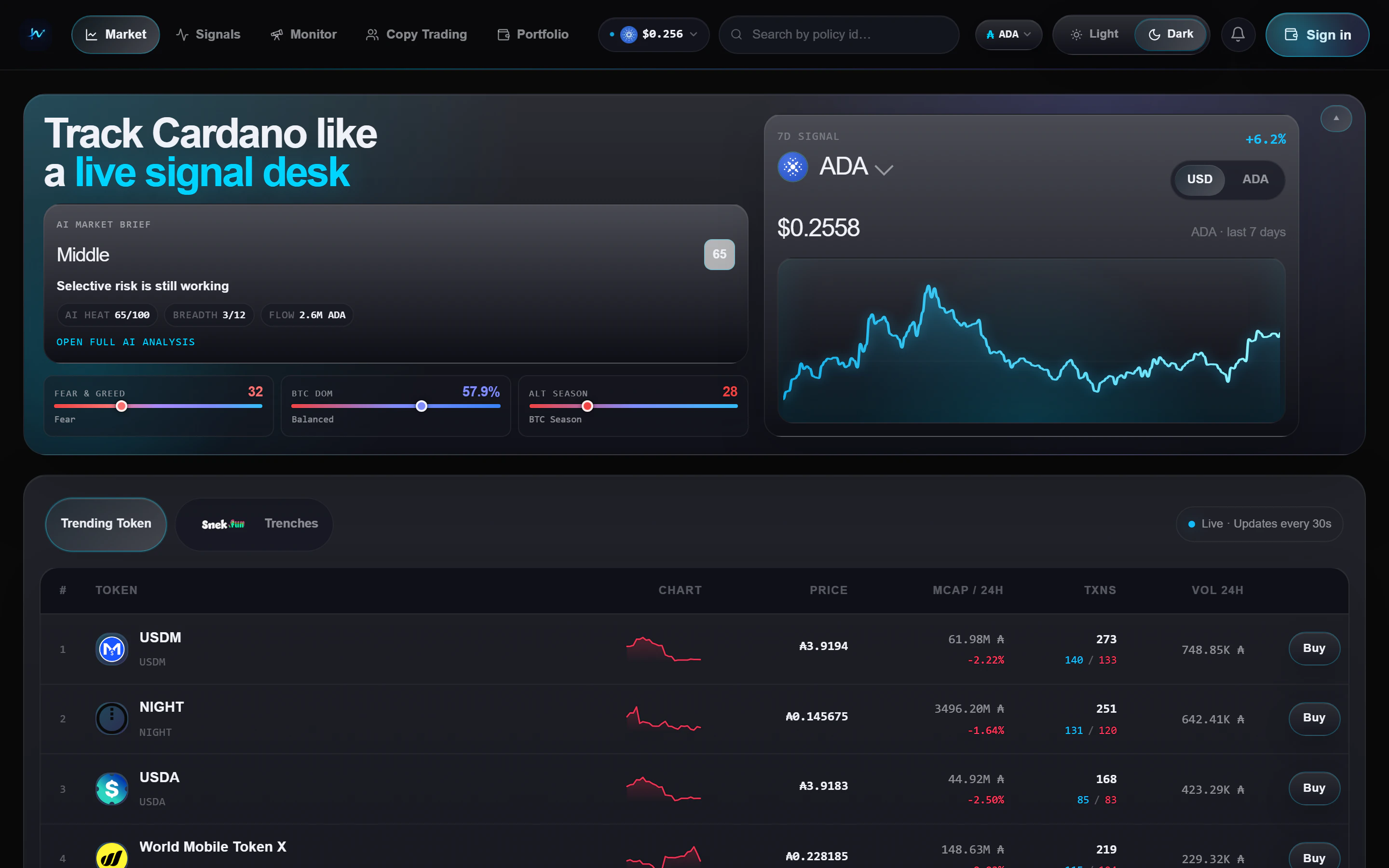
**Hizz** is a trading workspace for Cardano. It helps you scan the market,
spot early momentum, watch smart wallets, and act from the same interface
instead of bouncing between explorers, token lists, and wallet tools. The AI
Trading workspace also lets you backtest and deploy deterministic strategies
on Strike perpetuals.
Trending tokens, snek.fun Trenches, macro gauges, and a live market brief.
A shortlist of tokens that already passed Hizz's early-momentum and
holder-quality checks.
Follow tracked wallets and the snek.fun leaderboard in real time.
A fast read on regime, breadth, flow, and what to check next.
Connect a Cardano wallet and review live balances, allocation, and NFTs.
Backtest public or private strategies, deploy an agent on Strike, and
monitor live net PnL, fills, fees, and risk controls.
## Why people use it
Open the home page and get market tone, macro context, and active token
flow in a few seconds.
Trenches and Signals are built for pre-bond and newly bonded tokens, so
you can focus on what is moving now.
Hizz lets you move from a smart-wallet feed to a token view, then into a
trade or portfolio check without changing tools.
The trade widget shows the fee up front. See the full breakdown on the
[Trading fees](/trading-fees) page.
Use the Strategy Library or create a private AI strategy, run its
backtest, deploy in paper or live mode, and monitor it under My agent.
## Start here
* **[Quickstart](/quickstart)** for the fastest path from landing page to a
trade-ready workflow.
* **[Trading fees](/trading-fees)** for the Hizz platform-fee rules on
snek.fun trades, routed quotes, and Strike AI Trading fills.
* **[AI Trading](/features/ai-trading)** for the strategy-to-agent workflow.
* **[AI Trading strategies](/ai-trading/strategies)** for the current strategy
catalog and the assumptions behind each backtest.
* **[Signals](/features/signals)** if you want Hizz's highest-conviction
shortlist first.
* **[Monitor](/features/monitor)** if you care more about following wallets
than scanning the token table.
You do not need a wallet to browse Hizz. Connect a wallet only when you want
to trade or open the portfolio workspace.
## What Hizz is for
**Hizz** is a trading workspace for Cardano. It helps you scan the market,
spot early momentum, watch smart wallets, and act from the same interface
instead of bouncing between explorers, token lists, and wallet tools. The AI
Trading workspace also lets you backtest and deploy deterministic strategies
on Strike perpetuals.
Trending tokens, snek.fun Trenches, macro gauges, and a live market brief.
A shortlist of tokens that already passed Hizz's early-momentum and
holder-quality checks.
Follow tracked wallets and the snek.fun leaderboard in real time.
A fast read on regime, breadth, flow, and what to check next.
Connect a Cardano wallet and review live balances, allocation, and NFTs.
Backtest public or private strategies, deploy an agent on Strike, and
monitor live net PnL, fills, fees, and risk controls.
## Why people use it
Open the home page and get market tone, macro context, and active token
flow in a few seconds.
Trenches and Signals are built for pre-bond and newly bonded tokens, so
you can focus on what is moving now.
Hizz lets you move from a smart-wallet feed to a token view, then into a
trade or portfolio check without changing tools.
The trade widget shows the fee up front. See the full breakdown on the
[Trading fees](/trading-fees) page.
Use the Strategy Library or create a private AI strategy, run its
backtest, deploy in paper or live mode, and monitor it under My agent.
## Start here
* **[Quickstart](/quickstart)** for the fastest path from landing page to a
trade-ready workflow.
* **[Trading fees](/trading-fees)** for the Hizz platform-fee rules on
snek.fun trades, routed quotes, and Strike AI Trading fills.
* **[AI Trading](/features/ai-trading)** for the strategy-to-agent workflow.
* **[AI Trading strategies](/ai-trading/strategies)** for the current strategy
catalog and the assumptions behind each backtest.
* **[Signals](/features/signals)** if you want Hizz's highest-conviction
shortlist first.
* **[Monitor](/features/monitor)** if you care more about following wallets
than scanning the token table.
You do not need a wallet to browse Hizz. Connect a wallet only when you want
to trade or open the portfolio workspace.